
 vs

Sendbox vs Smartlead 2026: One Bundled Plan Against a Five-Product Suite
Smartlead splits sending, prospecting, dialing, AI, and dedicated infrastructure into five separate purchases. Sendbox puts dedicated infrastructure and the full deliverability toolkit into a single Launch plan, and leaves prospecting and calling to other tools.

At a glance
18 features Sendbox edge5
- Tie9
 Smartlead edge4
Sendbox from
$89/mo
Smartlead from
$39/mo
The verdict
The isolation story favors Sendbox. Dedicated IPs, per-mailbox health visibility, and inbox placement testing are baked into every Sendbox tier from the start, nothing to add on. Smartlead undercuts on entry price and throws in unlimited lead storage, but its default infrastructure is shared across customers; getting real isolation means paying extra for the SmartInfra add-on, which typically pushes the effective bill past what Sendbox charges outright.
Worth flagging too: Smartlead markets "unlimited" mailboxes, but its own Fair Usage Policy caps that at 100 seats on Basic, 300 on Popular, and 800 on Pro (per smartlead.ai/fair-use-policy). Where Smartlead pulls ahead is on breadth, a mobile app, a lead database, a dialer and an AI agent suite that Sendbox doesn't offer. Teams that care most about not sharing sender reputation with strangers on the same infrastructure should lean Sendbox.
Teams that want a more modular, mix-and-match product lineup with a cheaper entry point may prefer what Smartlead offers.

Where it leads
Sendbox
- Dedicated IPs on every plan starting at $89/mo, your reputation is fully yours
- Fully isolated infrastructure included in base price, not a paid add-on
- Per-mailbox reply and bounce rate visibility so you can pull struggling mailboxes into warmup

Where it leads
Smartlead
- Lower entry price at $39/mo (mailboxes capped at 100 per FUP)
- Lead storage advertised as unlimited on every plan (subject to FUP)
- Mobile app for iOS and Android for on-the-go campaign management
On this page· 1/11
- The Verdict
- Feature Comparison
- Pricing
- Default Shared on Smartlead vs Default Dedicated on Sendbox
- Features and Product Suite
- Email Warmup and Mailbox Protection
- Adding Up Five SmartProducts vs One Sendbox Tier
- Smartlead for Modular Builders, Sendbox for Bundle Buyers
- How We Compared These Platforms
- Pros & Cons
- FAQ
Feature by feature
Sendbox vs Smartlead: Feature-by-Feature
Filter by category, or show only the rows where the two tools actually differ.
| Feature | Sendbox | Smartlead |
|---|---|---|
| Infrastructure | ||
| Dedicated IPs | Sendbox Every planEdge A dedicated IP comes standard starting with the entry-level Launch plan, no upgrade needed | Smartlead SmartInfra add-on Private servers only come through SmartInfra, a separate product that costs extra on top of the base plan |
| Isolated Infrastructure | Sendbox YesEdge Each account gets its own fully isolated sending environment, nothing pooled or shared | Smartlead Add-on only Private, non-shared infrastructure is gated behind the paid SmartInfra add-on |
| Email Warmup | Sendbox Unlimited, AI-powered An AI-driven warmup engine is built to work around ESP spam-detection filters | Smartlead Ultra Premium Warmup Warmup runs on a reward-based pool shared across Smartlead's user network |
| Email Validation | Sendbox Built-in, every plan Email validation is included on every plan with no per-check credits (fair use applies) | Smartlead Built-in verifier A verification tool ships natively inside the platform |
| Inbox Placement Testing | Sendbox Built-in Preview whether a campaign lands in the inbox or spam before it ever goes live | Smartlead SmartDelivery Inbox testing exists as its own dedicated feature within the platform |
| Blacklist Monitoring | Sendbox Built-inEdge IPs and domains are watched continuously, with automatic alerts the moment either gets blacklisted | Smartlead Free tool only Only a one-off domain blacklist lookup is offered, there's no ongoing monitoring |
| Sending | ||
| Email Accounts | Sendbox UnlimitedEdge Bounded only by a fair-use ceiling set high enough that normal usage never gets close | Smartlead FUP limits apply Marketed as unlimited, but the Fair Usage Policy actually caps seats at 100 on Basic, 300 on Popular, and 800 on Pro (per smartlead.ai/fair-use-policy) |
| Monthly Emails | Sendbox 75K to 10M Sending volume climbs from 75K on the entry tier up to 10M on the top tier | Smartlead Based on plan Send volume scales with the plan tier, with pricing starting from $39/mo |
| Lead Storage | Sendbox 30K to Unlimited Storage starts at 30K on the entry tier and opens up to unlimited on the higher tiers | Smartlead Unlimited (FUP) Marketed as unlimited lead storage across every plan, though still governed by the Fair Usage Policy |
| Features | ||
| Unified Inbox | Sendbox Yes Replies from every mailbox land in one shared, unified view | Smartlead Yes Ships as the Unified Master Inbox, complete with automatic reply categorization |
| Built-in Dialer | Sendbox Coming soon A phone dialer is on the roadmap, not live yet | Smartlead YesEdge Offered as SmartDialer, one piece of the broader product suite |
| Lead Finder | Sendbox No No lead database. Bring your own leads and validate them before sending | Smartlead SmartProspectEdge Leads come triple-verified through the separate SmartProspect product |
| AI Agents | Sendbox AI tagging and reply agent Incoming replies are auto-tagged and can be auto-answered by AI | Smartlead SmartAgents Positioned as an AI-driven GTM workforce that automates outreach workflows end to end |
| CRM | Sendbox Via webhooks No built-in CRM. Signed webhooks push lead and reply events to your CRM, Zapier, Make or n8n | Smartlead YesEdge Deal management with a pipeline view is included natively |
| Webhooks | Sendbox YesEdge Six event types are available, each signed cryptographically for verification | Smartlead Basic Standard webhook support covers common integration needs |
| Mobile App | Sendbox No Currently web-only, there's no native mobile app yet | Smartlead YesEdge Native iOS and Android apps let you manage campaigns away from a desktop |
| Free Email Tools | Sendbox 14 free tools Free public tools include a blacklist checker, SPF/DKIM checker, DNS lookup, email validator, spam checker and email header analyzer | Smartlead 10+ free tools Includes an SPF generator, DKIM generator, DMARC checker, email header analyzer, and several others |
| Scale | ||
| White-label | Sendbox Scale tier and above Full white-labeling with custom reporting, plus a dedicated account manager on the top tier | Smartlead Available White-label options open up on the higher-priced plan tiers |
Showing 18 of 18 features.
Switch to Sendbox
Dedicated IPs. Isolated infrastructure. From $89/mo.
Pricing
Pricing Comparison
SendboxAll-in-one- $89/mo
Launch
Emails 75,000Leads 30,000
Dedicated IPs, full deliverability suite
- $199/mo
Growth
Emails 250,000Leads 100,000
Dedicated IPs, full deliverability suite
- $409/mo
Scale
Emails 500,000Leads Unlimited
White-label, dedicated IPs, unlimited leads
- $799/mo
Fleet
Emails 2,500,000Leads Unlimited
White-label, custom reports, dedicated account manager
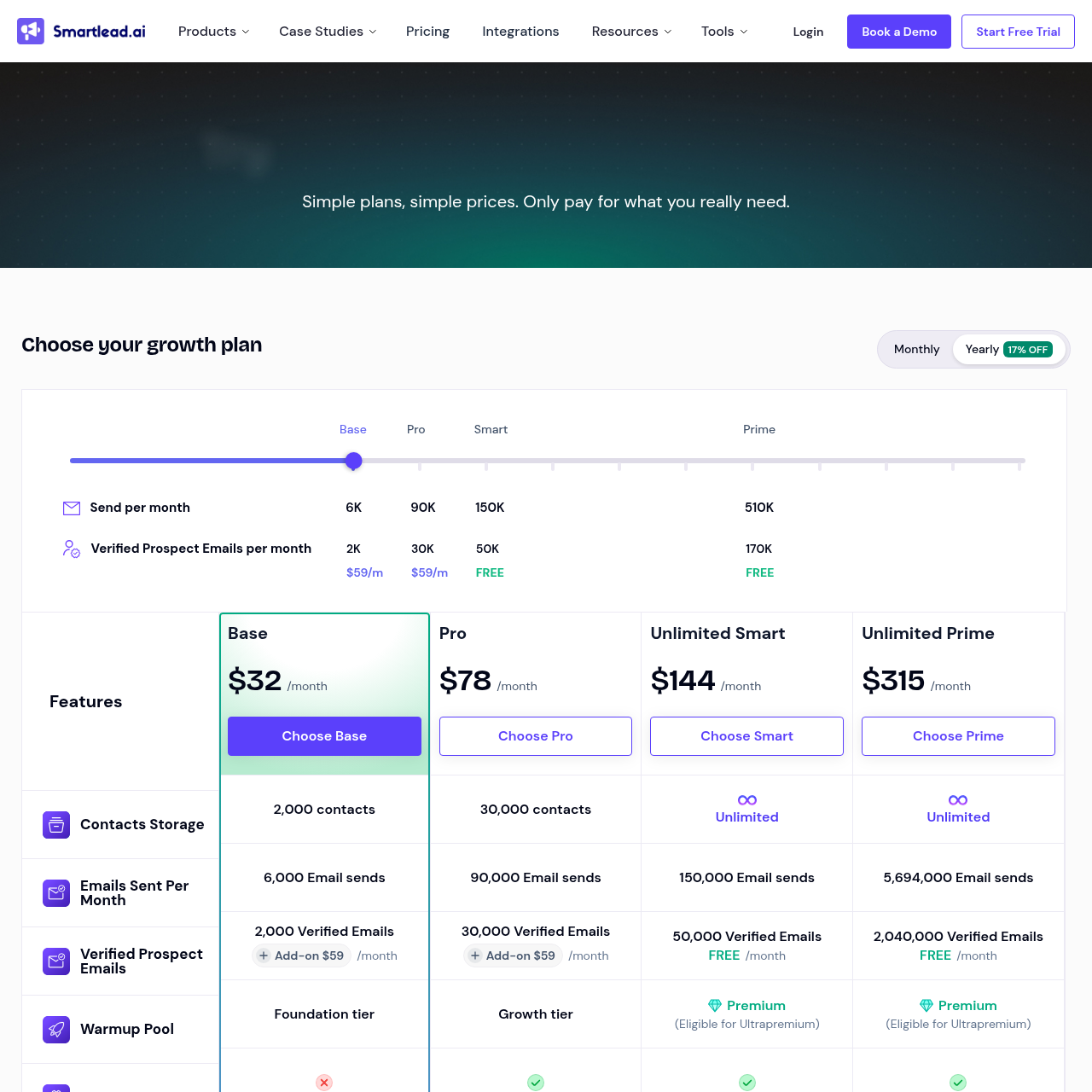
Smartlead- $39/mo
Basic
Emails Tier-based volumeLeads Unlimited (FUP)
Shared infrastructure, mailboxes capped at 100 per FUP
- $94/mo
Pro
Emails Higher volumeLeads Unlimited (FUP)
Shared infrastructure, mailboxes capped at 300 per FUP
- $174/mo+
Custom
Emails Custom volumeLeads Unlimited (FUP)
Shared infrastructure, mailboxes capped at 800 per FUP
Pricing takeaway
Smartlead looks cheaper on the surface at $39/mo vs $89/mo. But Smartlead's base plans run on shared infrastructure. To get dedicated servers comparable to what Sendbox includes on every plan, you need SmartInfra as an add-on, which pushes total cost above Sendbox's pricing. Sendbox's $89/mo Launch plan bundles dedicated IPs, 75,000 emails, email validation, inbox placement testing, blacklist monitoring, warmup, and the AI reply agent into one price. On Smartlead, several of those are separate products or add-ons. Smartlead advertises unlimited mailboxes, but their Fair Usage Policy caps them at 100 on Basic, 300 on Popular, and 800 on Pro. Above those limits requires manual approval that Smartlead can refuse (per smartlead.ai/fair-use-policy). Lead storage is also listed as unlimited but subject to the same FUP.
Default Shared on Smartlead vs Default Dedicated on Sendbox
The key difference between Sendbox and Smartlead comes down to infrastructure isolation. We compared the technical architecture each platform advertises, and the distinction is clear. Sendbox assigns dedicated IPs on every plan starting at $89/mo.
Your sending environment is fully isolated from every other Sendbox user. If another customer gets blacklisted or flagged for spam, it has zero impact on your deliverability. This is built into the base price, not an upgrade.
Smartlead runs shared infrastructure on their $39/mo, $94/mo, and $174/mo plans. Your emails share IP pools and sending resources with other Smartlead users. This means a sender on your shared pool who triggers spam complaints can reduce inbox placement for everyone on that cluster, even if your own campaigns are clean.
Smartlead does offer dedicated servers through SmartInfra, but it is a separate paid add-on on top of your base plan. Sendbox also surfaces per-mailbox reply rate and bounce rate in real time, so you can see exactly which mailboxes are trending toward degradation and pull them into warmup before sending suffers. Smartlead also surfaces per-mailbox metrics, so this is more a matter of UI and workflow than a feature gap.
Both platforms offer email warmup. Sendbox uses an AI warmup engine designed to pass ESP detection filters. Smartlead offers their Ultra Premium Warmup system, which uses a reward-based warmup pool across their user network.
Both approaches have merit, and warmup quality is hard to measure objectively without controlled testing. What we can say is that AI-generated warmup patterns are designed to look more organic to Gmail and Outlook than pool-based warmup.
Key takeaways
- Sendbox: Dedicated IPs and full isolation included on every plan from $89/mo
- Smartlead: Shared infrastructure by default, SmartInfra add-on required for dedicated servers
- Sendbox: Per-mailbox reply and bounce rate visibility so you can pull struggling mailboxes into warmup
- Both offer warmup: Sendbox uses AI-generated patterns, Smartlead uses reward-based pools
Features and Product Suite
Smartlead has built one of the widest product ecosystems in cold email. They offer SmartProspect for lead finding with 3X verified contacts, SmartAgents for AI-powered GTM workflows, SmartDialer for calling, SmartDelivery for inbox placement testing, and SmartSenders for automated mailbox setup. They also have a mobile app for iOS and Android, which is something Sendbox does not offer yet.
On top of that, Smartlead provides 10+ free tools for SPF generation, DKIM setup, DMARC checking, and email header analysis. Sendbox takes a different approach. It does not try to cover prospecting, calling or CRM.
It focuses on sending and deliverability, and everything in that scope is in one platform: dedicated IPs, warmup, inbox placement testing, blacklist monitoring, email validation, AI reply tagging and the AI reply agent all live inside the same dashboard. In our view, this is easier to manage day to day because you do not need to worry about which add-ons are active. If you need a lead database or a dialer today, Smartlead covers more ground.
One area where Sendbox stands out is webhooks. Sendbox offers webhooks with 6 event types and cryptographic signature verification. This is a meaningful advantage if you run custom integrations or need to sync campaign events with external systems.
Smartlead supports basic webhooks, but without per-campaign granularity or signature verification. The honest downside for Sendbox: no mobile app. If you need to check campaign replies or pause sequences from your phone, Smartlead gives you that with native iOS and Android apps.
Sendbox is web-only for now. Both companies publish free diagnostic tools: Smartlead has its SPF, DKIM, and DMARC utilities, and Sendbox has free tools for blacklist checks, SPF/DKIM checks, DNS lookups, email validation and header analysis.
Key takeaways
- Smartlead: Modular suite with SmartProspect, SmartAgents, SmartDialer, SmartDelivery, SmartSenders
- Sendbox: Sending and deliverability in one platform, no lead database or dialer
- Sendbox: Webhooks with signature verification (6 event types)
- Smartlead: Mobile app (iOS/Android) and 10+ free email authentication tools
Start sending today
Set up in 15 minutes. Dedicated IPs on every plan.
Email Warmup and Mailbox Protection
Both platforms include email warmup (Smartlead's is advertised as unlimited but subject to their Fair Usage Policy), and the technology differs in ways that matter. Sendbox's AI warmup engine is designed to pass detection filters used by Gmail, Outlook, and other ESPs. The system generates engagement patterns that mimic organic human behavior in open rates, reply rates, and engagement timing.
This matters because ESPs are getting better at identifying artificial warmup, and flagged warmup can actually hurt your sender reputation. Smartlead uses their Ultra Premium Warmup system, which is a reward-based pool. Users in the Smartlead network exchange warmup emails with each other.
The pool is large, and the system is well established. Pool-based warmup has the advantage of scale, but the engagement patterns can look more uniform than AI-generated patterns. In practice, both approaches work for building initial sender reputation.
The bigger workflow question is what happens after warmup. Sendbox surfaces per-mailbox reply rate and bounce rate on the live campaigns dashboard. When a mailbox trends toward degraded metrics, you pull it from campaigns and put it back into warmup to rebuild reputation.
The visibility is continuous; the recovery runs through warmup. Smartlead also exposes per-mailbox metrics, so the visibility layer is comparable. The practical difference is how each platform surfaces the data and how easily you can move a mailbox from active sending back into warmup when metrics slip.
Key takeaways
- Sendbox: AI warmup generates organic engagement patterns to pass ESP detection
- Smartlead: Ultra Premium Warmup uses reward-based pool across their user network
- Sendbox: Per-mailbox reply and bounce rate visibility so you can pull struggling mailboxes into warmup
- Both platforms expose per-mailbox metrics; recovery runs through warmup on both
Adding Up Five SmartProducts vs One Sendbox Tier
Smartlead wins on entry price. Their Basic plan starts at $39/mo and advertises unlimited mailboxes and lead storage. However, Smartlead's Fair Usage Policy (smartlead.ai/fair-use-policy) caps mailboxes at 100 on Basic, 300 on Popular, and 800 on Pro.
Anything above those limits requires manual approval that Smartlead can refuse. Sendbox's Launch plan starts at $89/mo with 75,000 emails and 30,000 leads. On the surface, that is a $50/mo difference.
But the comparison changes when you look at what is included. Sendbox's $89/mo bundles dedicated IPs, isolated infrastructure, AI warmup, email validation, inbox placement testing, blacklist monitoring, and per-mailbox health visibility. On Smartlead, the $39/mo plan runs on shared infrastructure.
To get dedicated infrastructure comparable to Sendbox, you need to add SmartInfra, which is a separate product with its own pricing. Once you add SmartInfra to a Smartlead base plan, the total cost exceeds Sendbox's $89/mo. At higher volumes, the math favors Sendbox more clearly.
Sendbox's Scale plan at $409/mo gives you 500,000 emails and unlimited leads with dedicated IPs. White-label branding is available from the Scale plan at $409/mo. The Fleet plan at $799/mo adds 2.5 million emails, custom reports, and a dedicated account manager.
The Enterprise plan (custom pricing) handles up to 10 million emails per month. Smartlead advertises unlimited lead storage on every plan, including the $39/mo tier, though this is also subject to their FUP. Sendbox caps leads at 30,000 on Launch and 100,000 on Growth.
If you manage large contact databases and do not need infrastructure isolation, Smartlead's lead storage is generous within FUP limits.
Key takeaways
- Smartlead Basic: $39/mo with FUP-capped mailboxes (100) and leads, shared infrastructure
- Sendbox Launch: $89/mo with 75K emails, 30K leads, dedicated IPs included
- Smartlead + SmartInfra: Total cost for dedicated infrastructure exceeds Sendbox pricing
- Sendbox white-label from $409/mo (Scale); Fleet at $799/mo adds 2.5M emails and dedicated account manager
Smartlead for Modular Builders, Sendbox for Bundle Buyers
Choose Sendbox if deliverability protection is your top priority. Dedicated IPs and isolated infrastructure on every plan mean your sender reputation is never at the mercy of other users. We recommend Sendbox for teams sending 50K+ emails per month where inbox placement directly impacts revenue.
Agencies should look at the Scale plan at $409/mo for white-label, or the Fleet plan at $799/mo for white-label with 2.5M emails and a dedicated account manager. Choose Smartlead if you want a modular product ecosystem and shared infrastructure is acceptable for your sending volume. Smartlead is a good fit for teams who want to start at $39/mo and prefer choosing specific add-on products like SmartAgents or SmartProspect as they scale.
Keep in mind that mailboxes are capped by their Fair Usage Policy (100 on Basic, 300 on Popular, 800 on Pro), so plan accordingly if you manage many accounts. The mobile app is also a real advantage for founders or sales managers who monitor campaigns on the go. One thing to be straightforward about: Smartlead has a larger community and more case studies to reference.
AvoraGrowth reportedly generated $2M+ in pipeline using Smartlead, and Unlock Management reports 25% reply rates. Sendbox launched publicly in September 2026, which means no public case studies yet. Both platforms serve agencies well with white-label options.
Key takeaways
- Sendbox: Best for teams sending 50K+ emails/month who need infrastructure isolation
- Smartlead: Best for teams who want modular add-ons and a $39/mo starting price
- Sendbox white-label from $409/mo (Scale plan); Fleet ($799/mo) adds dedicated account manager
- Smartlead: Larger community with published case studies ($2M+ pipeline, 25% reply rates)
How We Compared These Platforms
We compared both platforms by reviewing their feature pages, pricing pages, documentation, and product announcements. We looked at the technical architecture each platform advertises, the deliverability tools included at each price tier, and the total cost of reaching feature parity between the two. To be transparent: as the founders of Sendbox, there is obvious bias.
But Sendbox was built specifically to address the deliverability problems caused by shared infrastructure on other platforms. This comparison reflects what each platform offers based on publicly available information, and we have called out every area where Smartlead wins, including lower entry pricing, unlimited lead storage, mobile apps, a lead database, and a dialer. For an independent perspective, check G2 and Capterra reviews for Smartlead.
Sendbox launched publicly in September 2026 and has few public reviews so far, so the fairest test is a trial on your own domains: run an inbox placement test before and after you move.
Key takeaways
- Comparison based on publicly available feature pages, pricing pages, and documentation
- Full transparency: as the founders of Sendbox, we have called out Smartlead advantages honestly
- Sendbox is new and has few public reviews; test placement on your own domains
Strengths & limitations
Pros & Cons
Strengths8
- Dedicated IPs on every plan starting at $89/mo, your reputation is fully yours
- Fully isolated infrastructure included in base price, not a paid add-on
- Per-mailbox reply and bounce rate visibility so you can pull struggling mailboxes into warmup
- AI warmup engine designed to pass Gmail and Outlook detection filters
- All deliverability tools included: warmup, email validation, placement testing, blacklist monitoring
- AI reply agent and AI reply tagging on every plan
- Webhooks with cryptographic signature verification (6 event types)
- White-label from $409/mo (Scale plan and above), custom reports and dedicated account manager on Fleet
Limitations5
- Higher entry price at $89/mo vs Smartlead's $39/mo
- Lead storage capped at 30K on Launch, 100K on Growth (unlimited only on $409/mo Scale and above)
- No mobile app for iOS or Android, web platform only
- No lead database, built-in CRM, or live dialer (dialer is on the roadmap)
- Newer platform (launched September 2026) with a smaller community and no published case studies yet
Strengths7
- Lower entry price at $39/mo (mailboxes capped at 100 per FUP)
- Lead storage advertised as unlimited on every plan (subject to FUP)
- Mobile app for iOS and Android for on-the-go campaign management
- SmartAgents for AI-powered GTM workflows and automated outreach
- 10+ free email tools: SPF generator, DKIM generator, DMARC checker, header analyzer
- SmartProspect for 3X verified leads and SmartSenders for automated mailbox setup
- Larger user community with published case studies (AvoraGrowth $2M+ pipeline, Unlock Management 25% reply rates)
Limitations5
- Shared infrastructure by default on all standard plans ($39, $94, $174/mo)
- Dedicated infrastructure requires SmartInfra add-on at additional cost on top of base plan
- "Unlimited" mailboxes are subject to Fair Usage Policy: 100 on Basic, 300 on Popular, 800 on Pro (per smartlead.ai/fair-use-policy)
- Modular product suite (SmartProspect, SmartAgents, SmartDialer, SmartDelivery) can get expensive when stacking multiple add-ons
- Feature fragmentation across separate sub-products means more dashboards to manage
Source material
Smartlead Screenshots

Ready to switch?
Your reputation, your control. No shared infrastructure.
Keep reading
It depends on what matters most to you. If deliverability and infrastructure isolation are your top priorities, Sendbox is the better choice. Every Sendbox plan from $89/mo includes dedicated IPs, isolated sending infrastructure, and per-mailbox health visibility. Smartlead starts cheaper at $39/mo but runs shared infrastructure by default. Smartlead advertises unlimited mailboxes but applies FUP limits: 100 on Basic, 300 on Popular, 800 on Pro (per smartlead.ai/fair-use-policy). To get dedicated servers on Smartlead, you need the SmartInfra add-on at additional cost.
Related guides from the blog
All articles →Smartlead vs Lemlist for Agencies: Cold Emailing Comparison
Compare smartlead vs lemlist for agencies to find the right cold email software. Discover features, scaling options, and explore alternat…
Smartlead vs Woodpecker Deliverability Review
Read this smartlead vs woodpecker deliverability review to compare cold email platforms, inbox placement, and sending infrastructure. Dis…
Instantly vs Smartlead Cold Email Comparison: Features & Scaling
Explore this instantly vs smartlead cold email comparison to find the best outreach platform for your sales team. Discover features and s…
Land in the inbox.Not the spam folder.
Every plan includes dedicated IPs. No per-seat fees. Cancel whenever you want.