

Woodpecker
Cold email platform · pricing breakdown
Woodpecker Pricing 2026: How the Contacted-Prospect Meter Actually Runs
Woodpecker meters contacted prospects instead of sends, a distinction most buyers overlook until it's already shaping their bill. Here's what actually trips that meter, and why costs climb faster once you pass 2,000 prospects.

- Plans
- 4
- Starts at
- $29/mo
- Extra costs flagged
- 5
- Updated
- May 2026
Bottom line
Woodpecker bills on the one metric most teams forget to plan around: contacted prospects, not messages sent. A contacted prospect is simply anyone you reach out to within a billing cycle, no matter how many follow-ups that involves, hit the same lead seven times in a sequence and the meter moves once; touch seven different leads once each and it moves seven times. That structure makes Woodpecker naturally cheap for high-touch, narrow-list outbound (founder-led sales, ABM sequences, carefully hand-built lists) and correspondingly expensive for wide, low-touch outbound (mass announcements, partner sourcing, spray-and-pray campaigns).
The $29 entry tier covers 500 contacted prospects a month and unlocks the entire platform, there's no feature gating by plan tier. Published pricing runs through Starter, Team Pro, and Max Pro up to roughly 5,000 prospects, with anything beyond that negotiated directly. The cost curve steepens noticeably past 2,000 prospects a month, which is roughly where most teams either lock in an annual contract for the discount or migrate to a per-send pricing model instead.
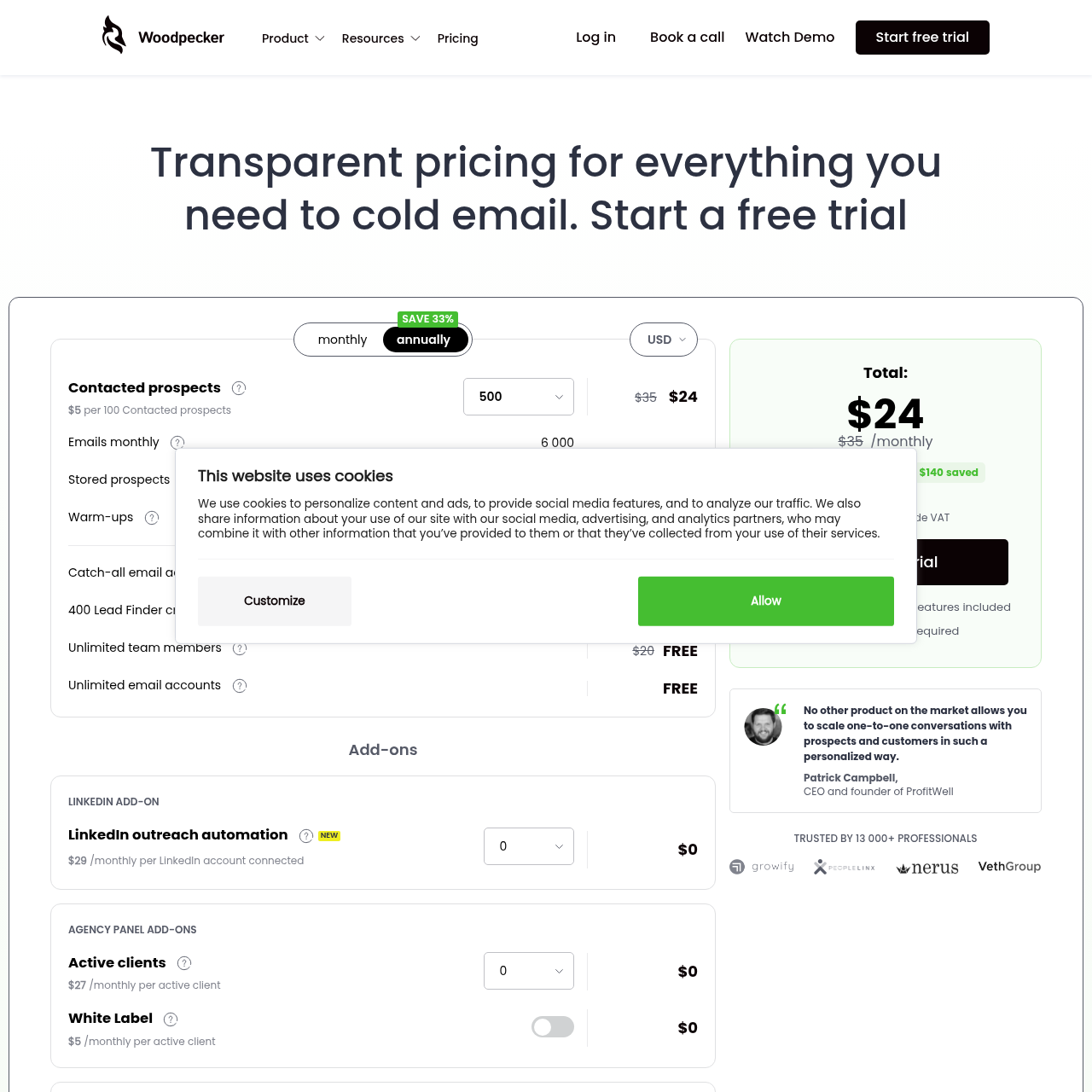
Plan breakdown
Woodpecker plans, side by side
500 Prospects
$29/mo
What you get
- 500 contacted prospects/mo
- Unlimited email accounts
- A/B testing
- Conditions and triggers
- Deliverability monitor
- Agency panel
Watch out for
- Only 500 contacted prospects
- No dialer
- No lead database
- Shared infrastructure
1,000 Prospects
$49/mo
What you get
- 1,000 contacted prospects/mo
- All features included
- Unlimited email accounts
- A/B testing
- Agency features
Watch out for
- No dialer
- No lead database
- Shared infrastructure
- No dedicated IPs
2,000 Prospects
$69/mo
What you get
- 2,000 contacted prospects/mo
- All features included
- Unlimited email accounts
- Full automation
Watch out for
- No dialer
- No lead database
- Shared infrastructure
Higher volumes
Scales with volume
What you get
- Custom prospect limits
- All features at every tier
- Dedicated support for large volumes
Watch out for
- No dialer at any tier
- No lead database at any tier
- No dedicated IPs at any tier
Cost estimator
The lowest list price is at $29/mo. Check the plan limits before you pick on price alone.
Estimate built only from the list prices above. Excludes add-ons, taxes, overages and discounts, see “What’s not included” below.
On this page8
Cost at volume
What each Woodpecker tier costs per contacted prospect
- 1
500 prospects, the entry tier
$29/mo
Works out to roughly $0.058 per prospect, the cheapest unit cost on the lineup, though the ceiling is tight enough that it typically only supports one SDR running one campaign.
- 2
1,000 prospects
~$49/mo (estimated)
Unit cost drops to about $0.049 per prospect. This is where most solo sales operators tend to settle, confirm the exact monthly figure during checkout.
- 3
2,000 prospects
~$69/mo (estimated)
Around $0.035 per prospect, where the pricing curve has clearly started to flatten. This is the typical ceiling for a two-to-three-person outbound team running ABM-style sequences.
- 4
5,000 prospects, near the top of the public tiers
Higher published tier, monthly
Per-prospect cost keeps dropping, but you're now near the edge of what's published, go higher and you're talking to sales for a custom quote.
- 5
An agency running 3 client books
Combined prospect count across all clients
Woodpecker tallies prospects at the workspace level, so a multi-client agency's bill scales with total reach across every book combined. Agency mode itself comes free at every tier.
How Sendbox compares
Sendbox plans start at $99/mo with dedicated IPs and the full deliverability suite included on every tier, no add-ons required.
How the contacted-prospect meter actually keeps score
This meter is what trips up buyers more than anything else about Woodpecker's pricing. A "contacted prospect" is one person in your address book reached at least once during the current billing cycle. Six follow-ups to the same lead registers as one tick.
One message each to six different leads registers as six ticks. Even a bounce counts, as long as Woodpecker attempted delivery before it bounced, and a reply doesn't remove that prospect from the meter for the rest of the cycle. This setup rewards campaigns that go deep on a small list, ABM, founder-led sales, a 500-prospect list worked through a 5-touch sequence, and penalizes campaigns that spread wide with minimal touches, like a single-touch announcement blasted to 5,000 people.
A team running both styles at once will find Woodpecker cheap for one and pricey for the other.
Key takeaways
- Each person counts once toward the meter, no matter how many touches
- Attempted sends that bounce still count
- A reply doesn't remove someone from the meter mid-cycle
- Deep sequences on small lists come out ahead; wide fan-out does not
Annual prepay exists, but the savings aren't shown up front
Every tier offers annual billing, but the actual discount percentage stays hidden until you reach the checkout screen. Public reports put the annual savings around 15 to 20 percent off the monthly rate, worth factoring into your total cost if you're committing to a year, since paying monthly effectively means absorbing that unstated convenience premium. Monthly billing makes sense for teams still in their first 90 days of validating whether their outbound motion actually works.
Annual billing makes more sense once a team has run a steady, consistent volume for at least two full quarters.
Key takeaways
- Annual savings run roughly 15-20 percent, hidden until checkout
- Monthly billing suits teams still validating their outbound motion
- Annual billing pays off after two quarters of steady volume
- No published mechanics for prorating mid-cycle upgrades
How billing works for agencies managing multiple clients
Agency functionality ships free at every tier, with no upgrade required, but there's a subtlety worth understanding: prospect counts roll up at the workspace level. Running three separate client campaigns of 700 prospects each puts you on a 2,100-prospect plan, not three individual 700-prospect plans, since there's no native per-client billing. Agencies tend to pick one of two structures.
The first bundles every client into a single Woodpecker workspace and pays one combined-prospect plan, cheaper overall. The second splits clients into separate workspaces billed independently, messier on cost but cleaner for per-client invoicing. Boutique agencies typically lean toward the first; managed-service shops that need enterprise-grade reporting per client lean toward the second.
Key takeaways
- Agency mode is free, but prospects roll up at the workspace level
- Three 700-prospect campaigns combine into one 2,100-prospect plan
- There is no built-in per-client billing, structure workspaces accordingly
- White-label client portals are available on the higher tiers
What happens when you cancel, pause, or want a refund
Monthly plans run through to the end of the current billing cycle when cancelled, with no published option for a partial-month refund. Annual plans work the same way in spirit, cancelling mid-term doesn't refund the unused portion, but you keep access until the term actually ends. There's no documented way to pause an account outright.
A team going through a quiet quarter has to cancel and re-sign later rather than pause and resume. Reactivation appears to preserve data for some window, though the exact duration isn't published, so it's worth asking support directly before deleting anything. For teams with seasonal outbound patterns, recruiting agencies, B2B SaaS companies that push hard at quarter-end, the absence of a pause option is a real planning constraint worth weighing against tools that support cleaner month-to-month cancel-and-resume cycles.
Key takeaways
- Monthly plans run to the end of the cycle, with no partial refund
- Annual plans keep access through the term but refund nothing unused
- There is no documented account-pause feature
- Data retention after cancellation is not publicly documented
Keep reading
One contacted prospect is one person in your address book that you reach at any point during the current billing cycle, no matter how many follow-ups you send them. Six follow-ups to a single lead ticks the meter once; one email each to six different leads ticks it six times. A reply doesn't remove someone from the meter for the rest of the cycle.
Ready to land in primary?
Get your own isolated Sendbox setup running and start sending inside 15 minutes.
Every plan includes a dedicated IP. Cancel whenever you want.

